

This website contains information intended solely for healthcare professionals. It is not meant for patients or the general public and should never replace professional medical advice, diagnosis, or treatment. Patients should not rely on this content for decisions about their health or medical care. If you are a patient and have questions about a CooperSurgical Genomics test or its implications, please contact your healthcare provider. Your provider can explain the benefits, risks, and limitations of the test and help determine whether it is appropriate for you.
CooperSurgical Genomics TRF, Consent and Report Updates
In preparation for the launch of the Select Syndrome Screen℠ test, we are updating the Test Requisition Form (TRF), consent and the report templates.
These changes will take effect on Monday, January 26, 2026.
To help you prepare, we’ve created this resource page with detailed overview of the TRF and report template updates, including a presentation and video walkthrough.
New TRF and Report
Alongside the introduction of the new Select Syndrome ScreenSM test, we’re introducing a new Test Requisition Form (TRF) to simplify and standardize the PGT ordering process between our global laboratories. The new TRF replaces regional variations, creating one streamlined form for all customers worldwide
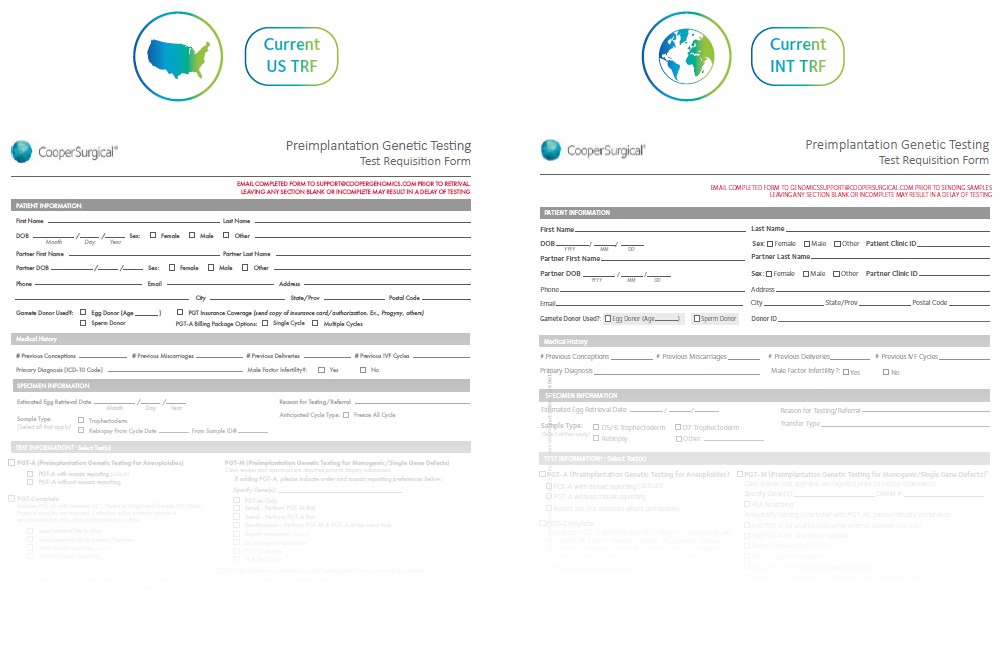
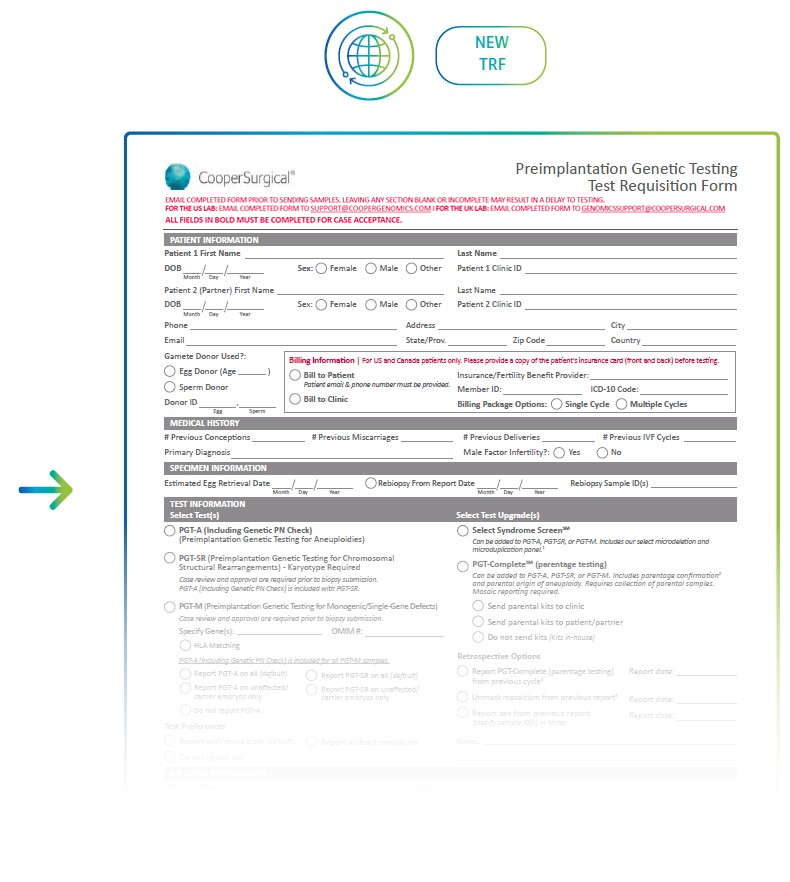
Key Changes
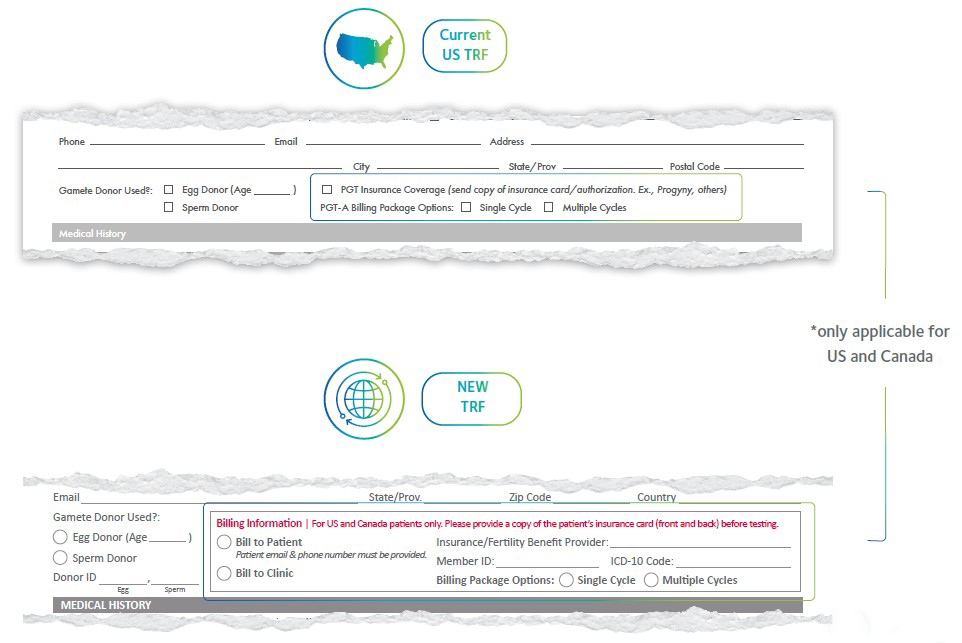
For US and Canada, the billing section is now more comprehensive and clearly marked. Mandatory fields are highlighted, and flexible billing options make it easier to manage patient or clinic payments.
- More comprehensive billing section for US and Canada patients
- Sections in bold are mandatory
- Bill to patient or clinic
- Billing package options
- Simplified sections for tests, test upgrades, preferences, and retrospective options.
- PGT-CompleteSM name updated to ‘PGT-CompleteSM (parentage testing)’.
- PGT-CompleteSM has been moved from being its own standalone test to being an upgrade that can be added to PGT-A, PGT-SR, or PGT-M.
- PGT-A or PGT-SR should be selected when ordering PGT-CompleteSM (parentage testing) alongside PGT-M.
- PGT-A will be added to PGT-Complete unless another test is selected.
- Select Syndrome ScreenSM is a test upgrade that can be added to PGT-A, PGT-SR, or PGT-M.
- PGT-A or PGT-SR must be selected when ordering Select Syndrome ScreenSM alongside PGT-M
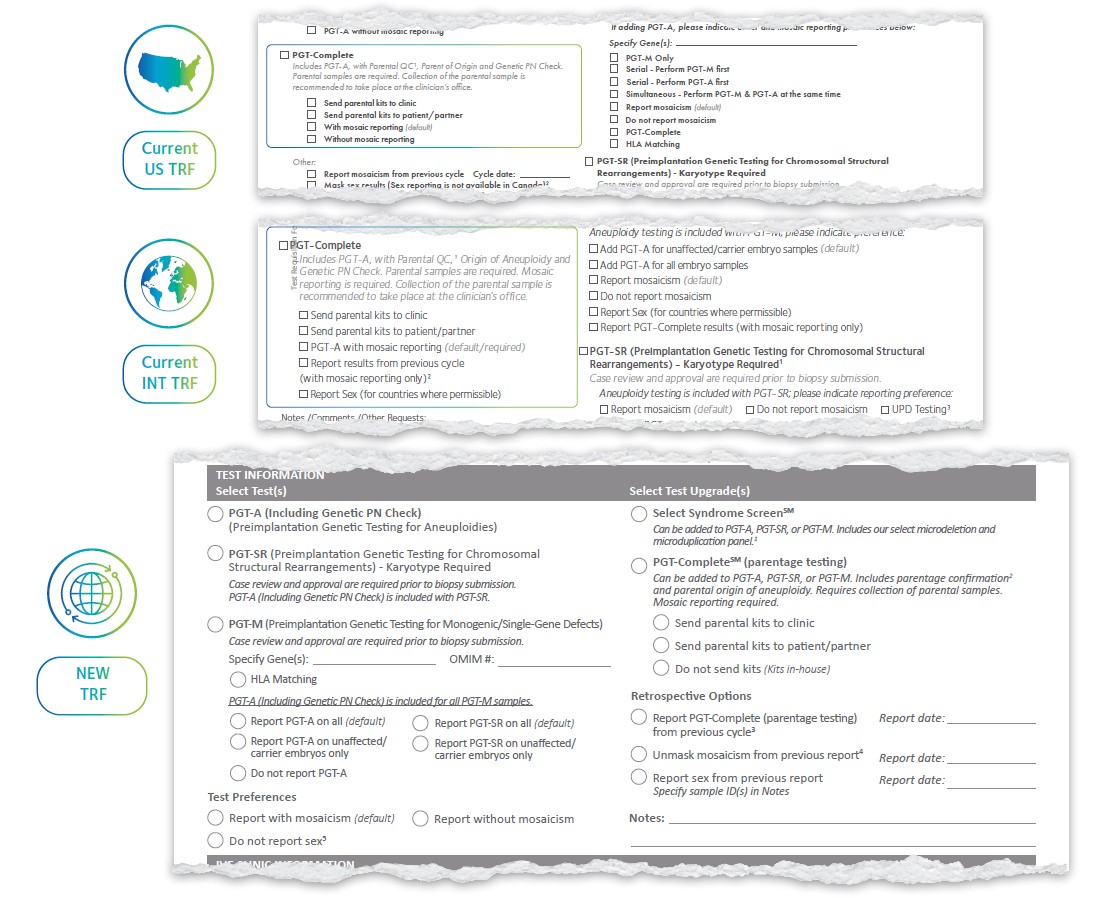
- Simpler ordering: Select mosaicism and sex reporting preferences for the entire case under ‘Test Preferences’
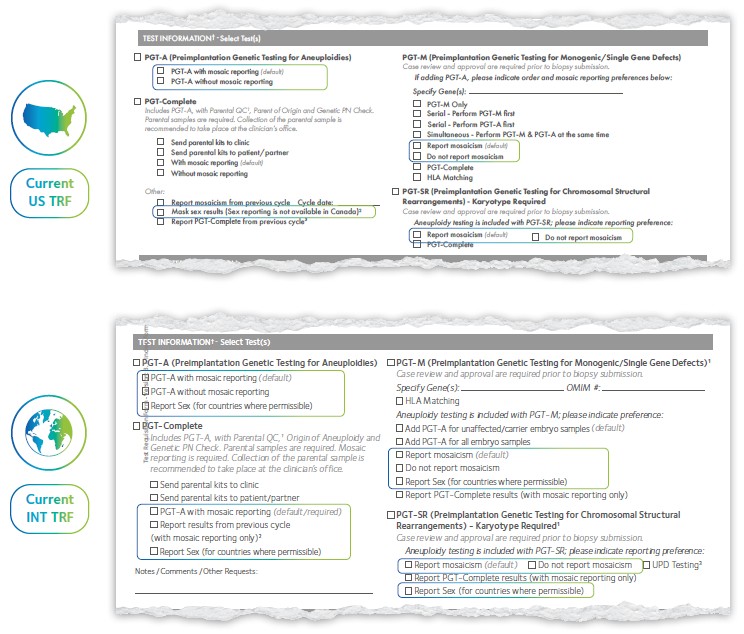
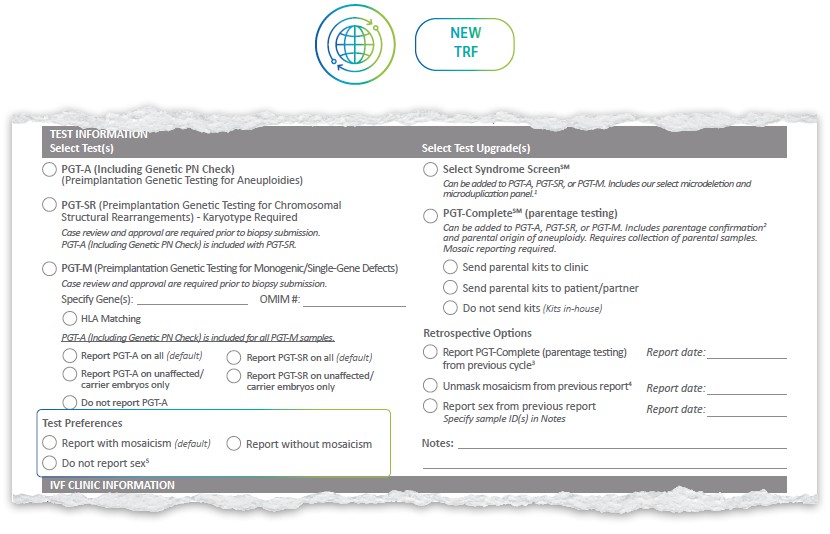
*If a reporting preference is not selected, the default option will be applied
- Simpler ordering: All retrospective testing options can be ordered under ‘Retrospective Options’
- ‘Unmask mosaicism from previous report’ and ‘Report sex from previous report’ have been added as retrospective options
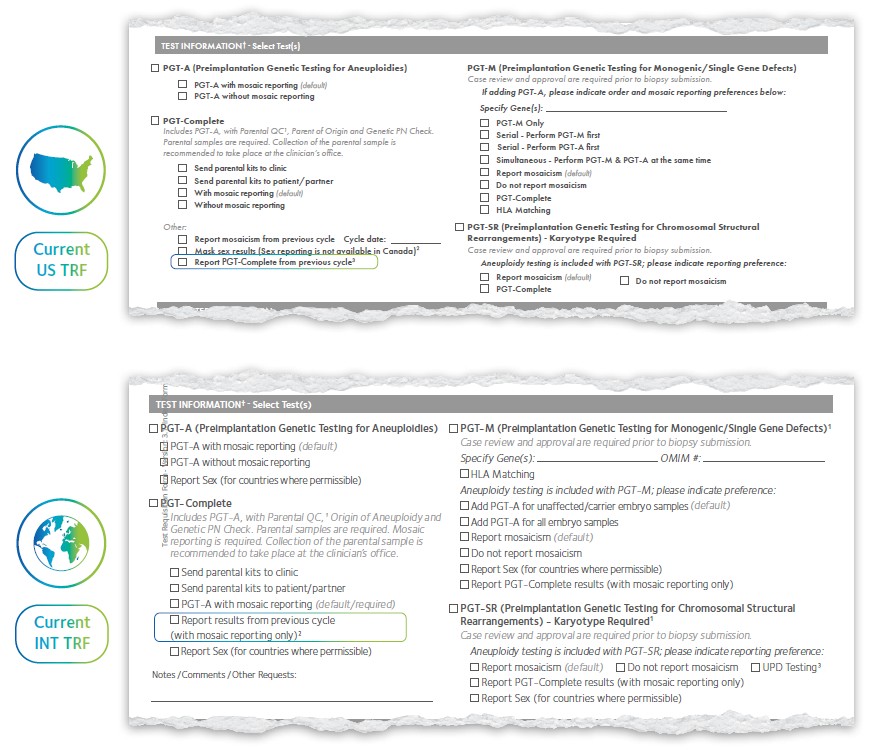
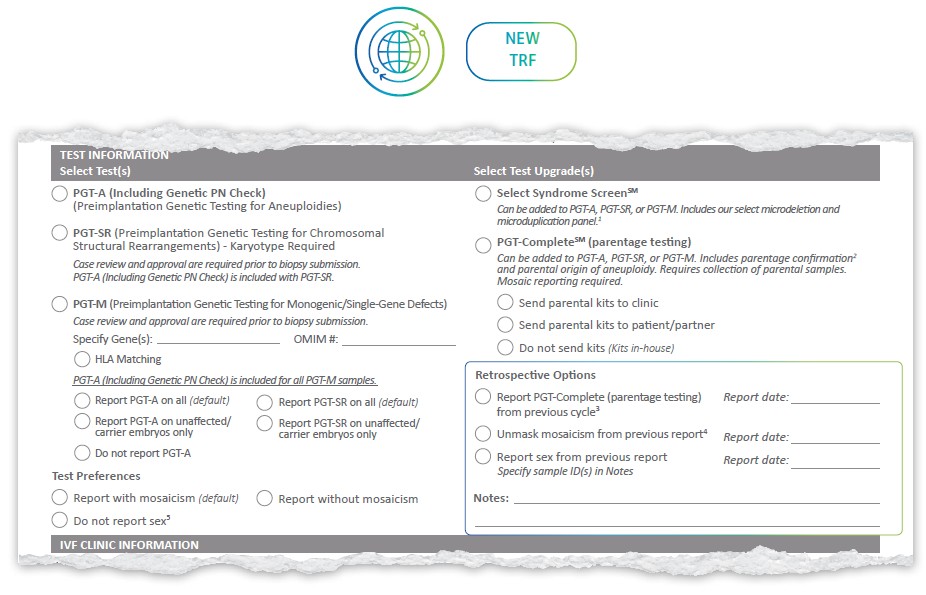
Requested retrospective data to be indicated in the notes section.
Reporting options for PGT-M have been standardized.
The default is now to report PGT-A on all embryos, with clear
alternatives available for specific preferences.
- PGT-A testing is now included in all PGT-M cases, with one per-embryo fee, but will be reported as per the preferred option selected on the new TRF.
- When PGT-SR is ordered alongside PGT-M, ‘PGT-SR on all’ is the default option, however, ‘Report PGT-SR on unaffected/carrier embryos only’ can be selected.
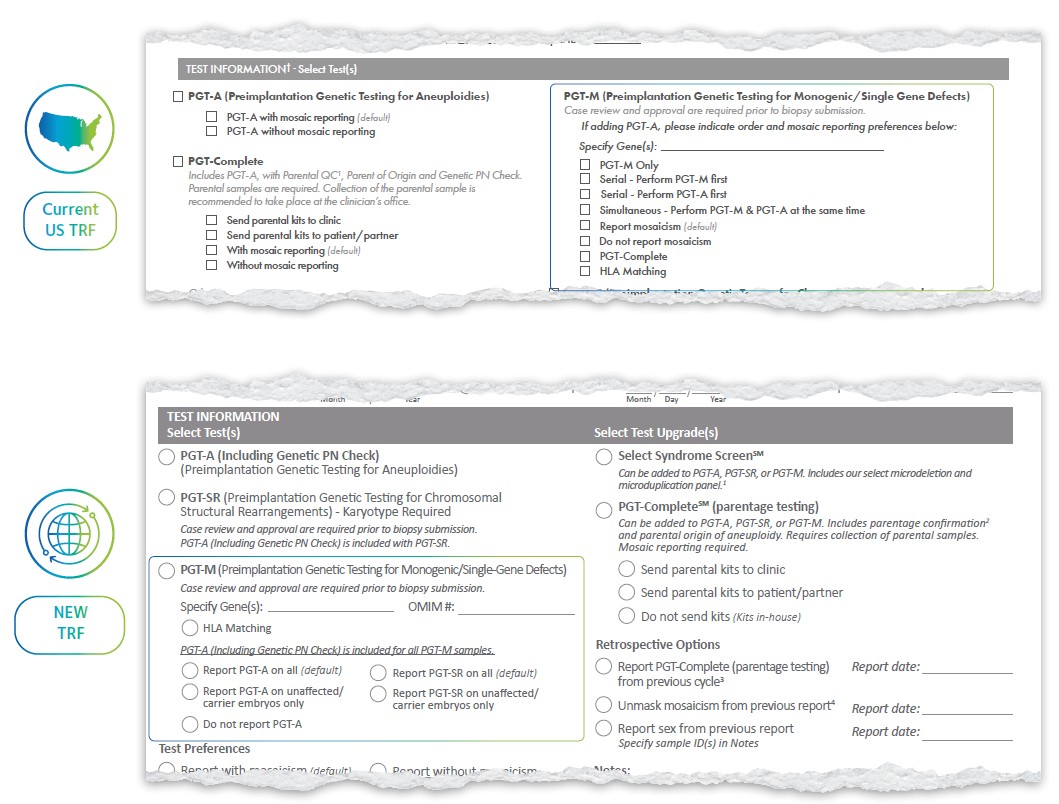
For US Customers:
- The default option on the new TRF is to report PGT-A on all embryos (previously Simultaneous’). Other options:
- Do not report PGT-A (previously ‘PGT-M only’)
- Report PGT-A on unaffected/carrier embryos only (previously ‘Serial: Perform PGT-M first’)
- Please note that ‘Serial: Perform PGT-A first’ is no longer available.
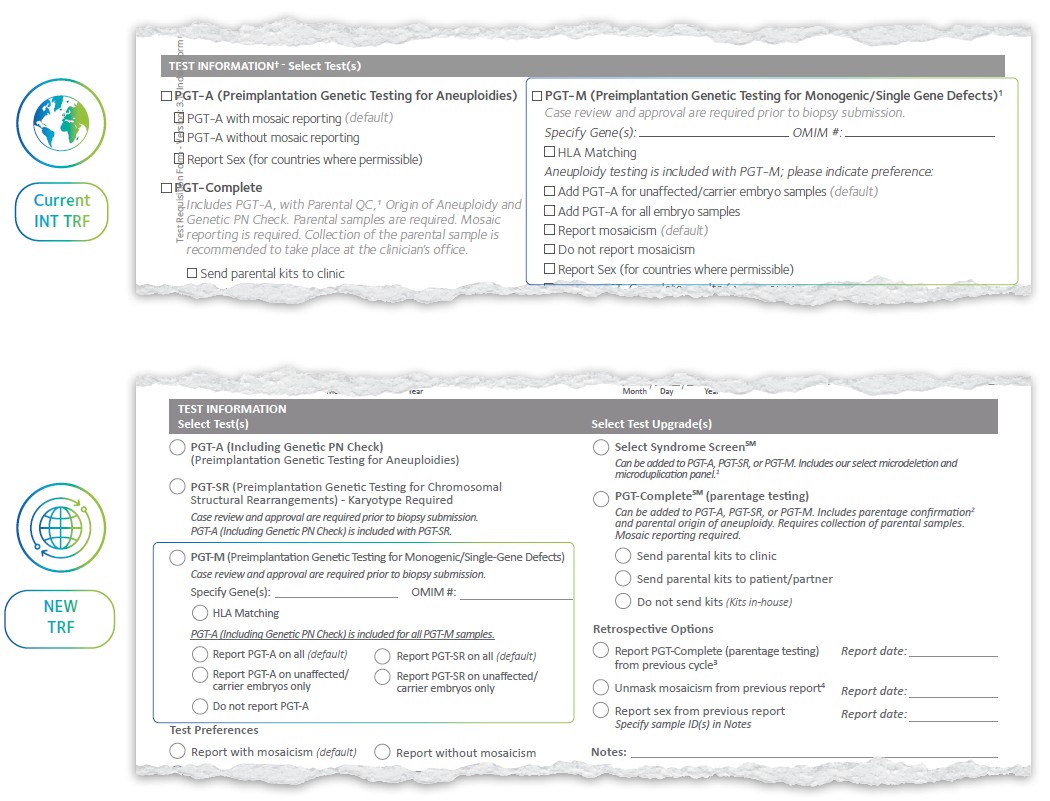
For International Customers:
- The new default option is to report PGT-A on all embryos. Other options:
- Report PGT-A on unaffected/carrier embryos only
- Do not report PGT-A
Examples: How to use
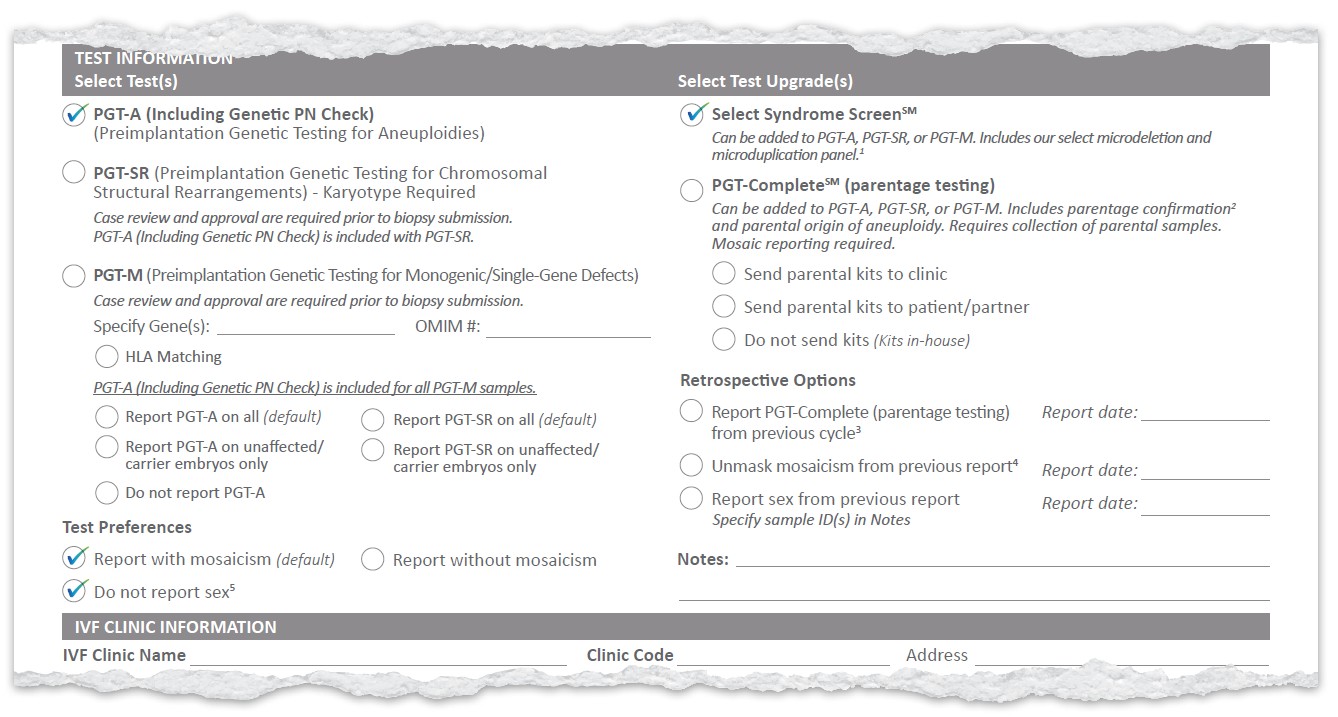
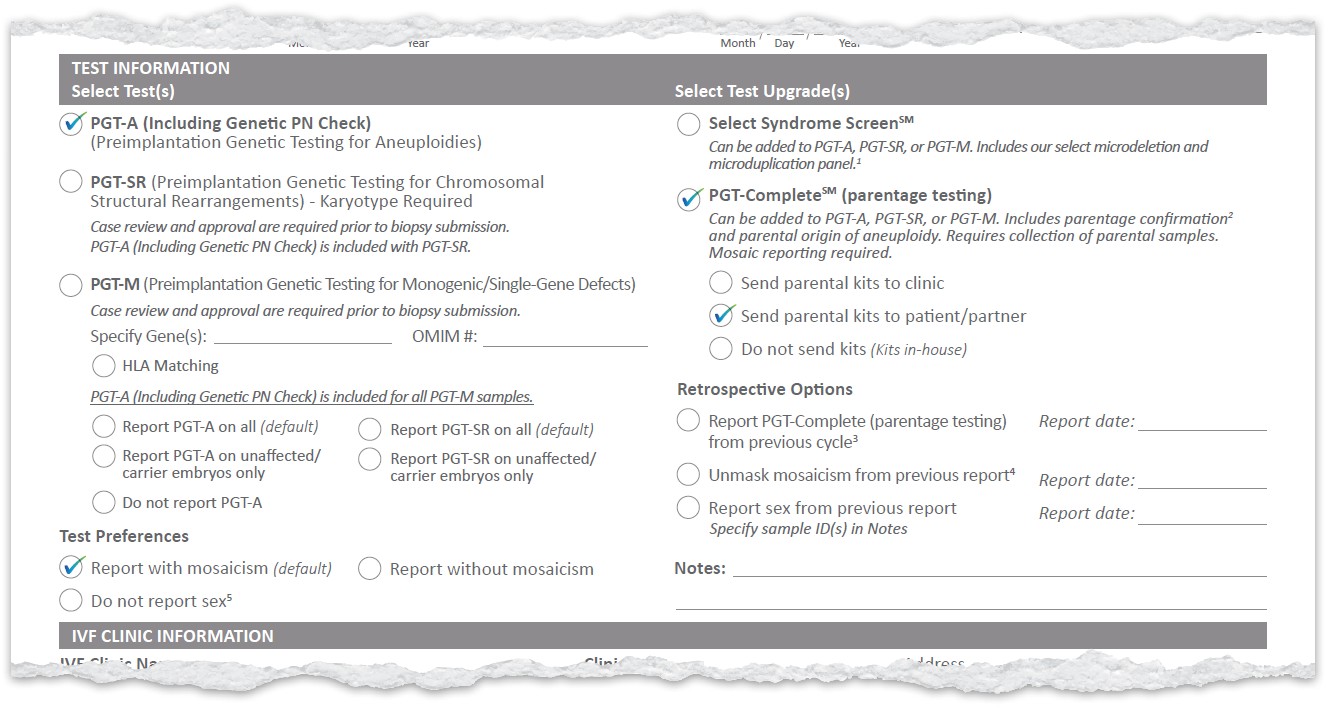
Example Test Selection
Here are examples of how to select tests and upgrades on the new form.
These combinations show how you can tailor reporting to your needs with the new TRF.
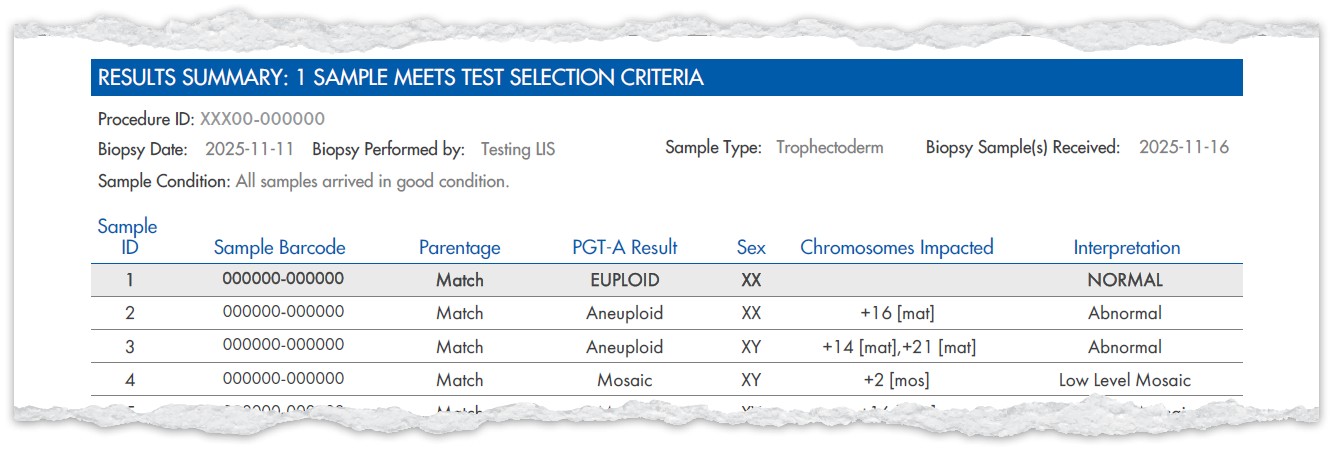
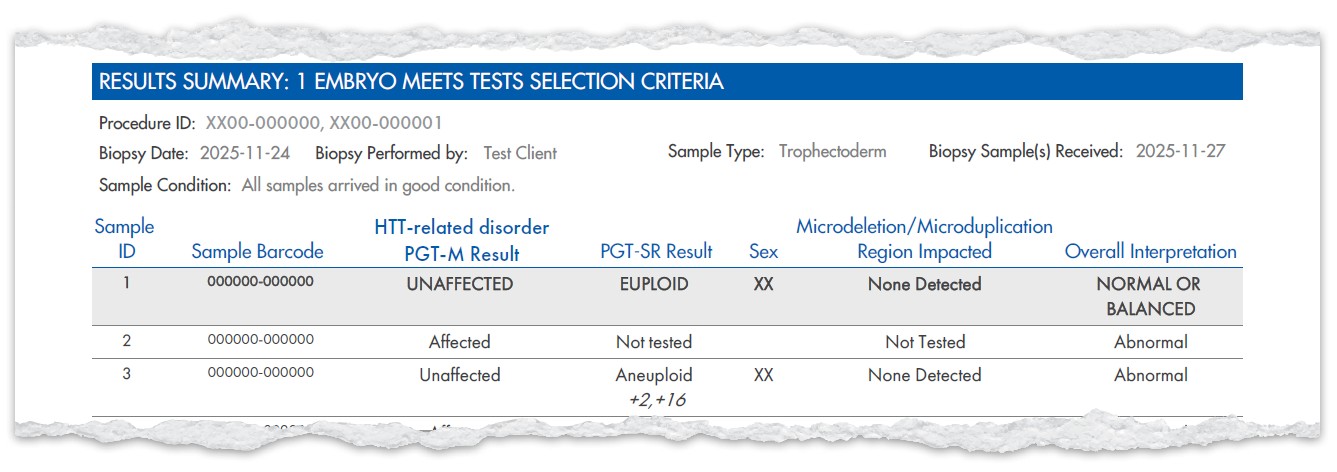
Example Results
Example Test Selection
Here are examples of how to select tests and upgrades on the new form.
These combinations show how you can tailor reporting to your needs with the new TRF.
Example Results
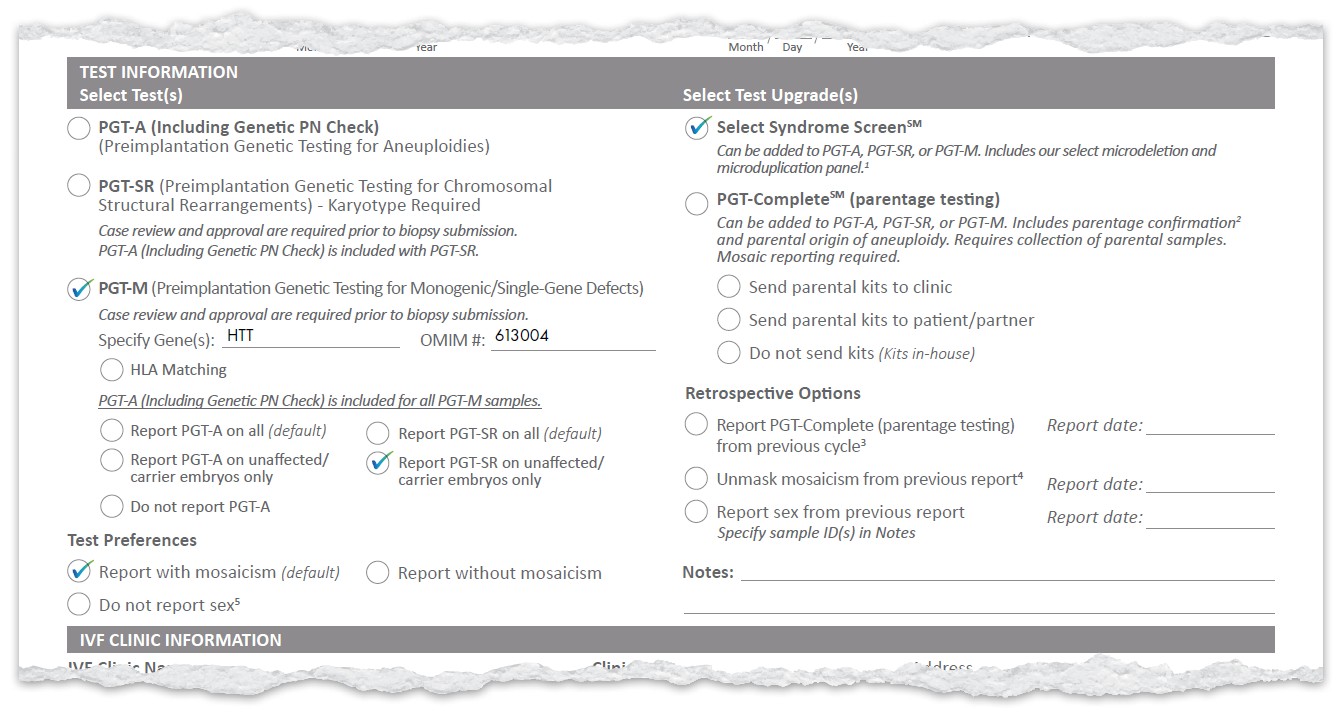
Example Test Selection
Here are examples of how to select tests and upgrades on the new form.
These combinations show how you can tailor reporting to your needs with the new TRF.
Example Results
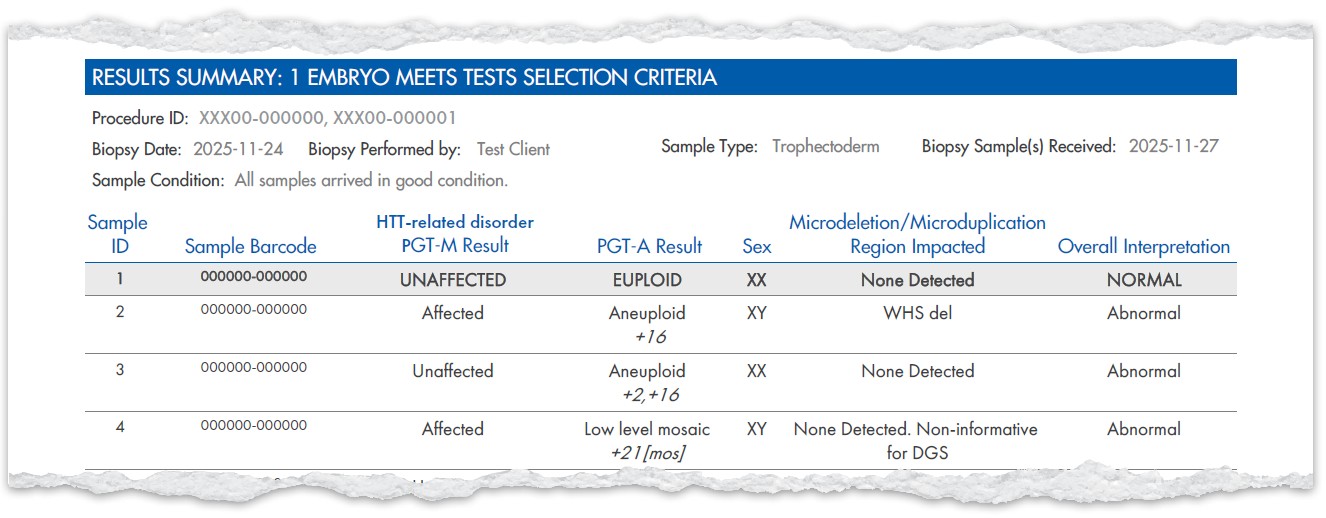
Example Test Selection
Here are examples of how to select tests and upgrades on the new form.
These combinations show how you can tailor reporting to your needs with the new TRF.
Example Results
New XIFIN Report
New XIFIN Report Templates
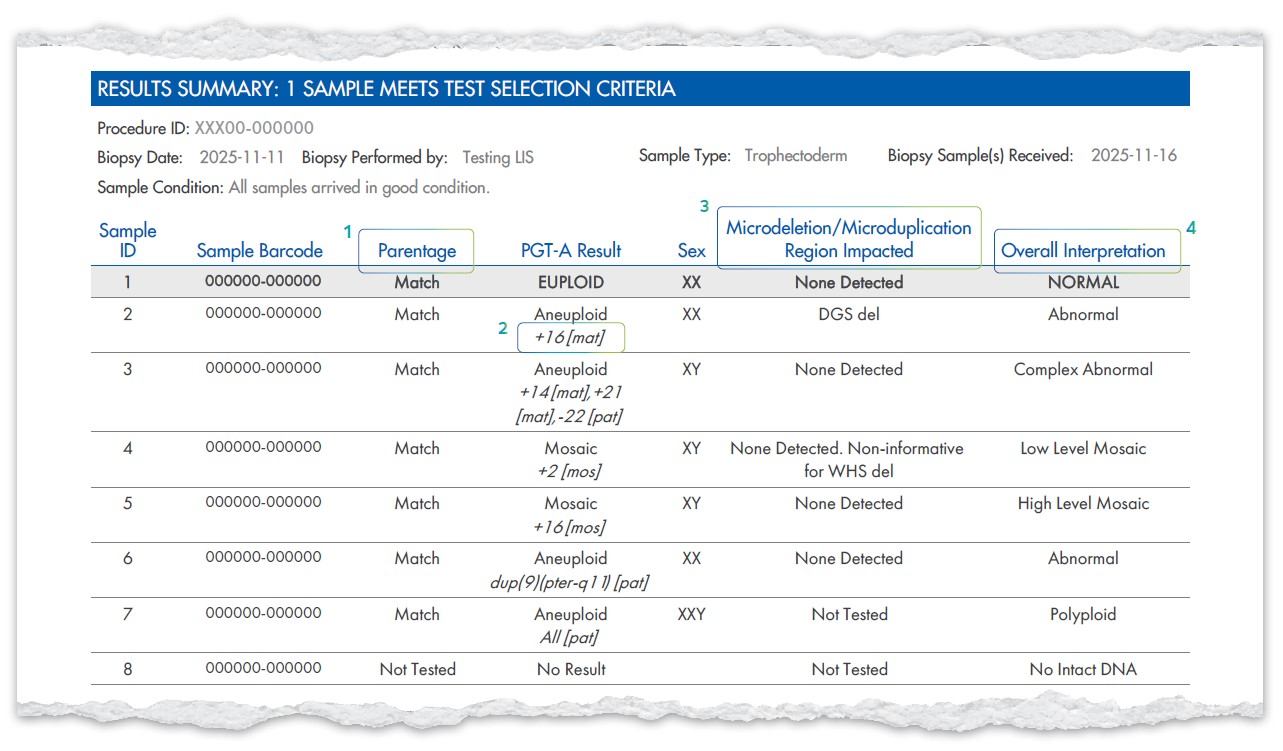
Alongside the new TRF, we’re updating the report templates to make results clearer and more comprehensive. These changes ensure that new options like Select Syndrome Screen are fully integrated and that interpretations are easier to understand.
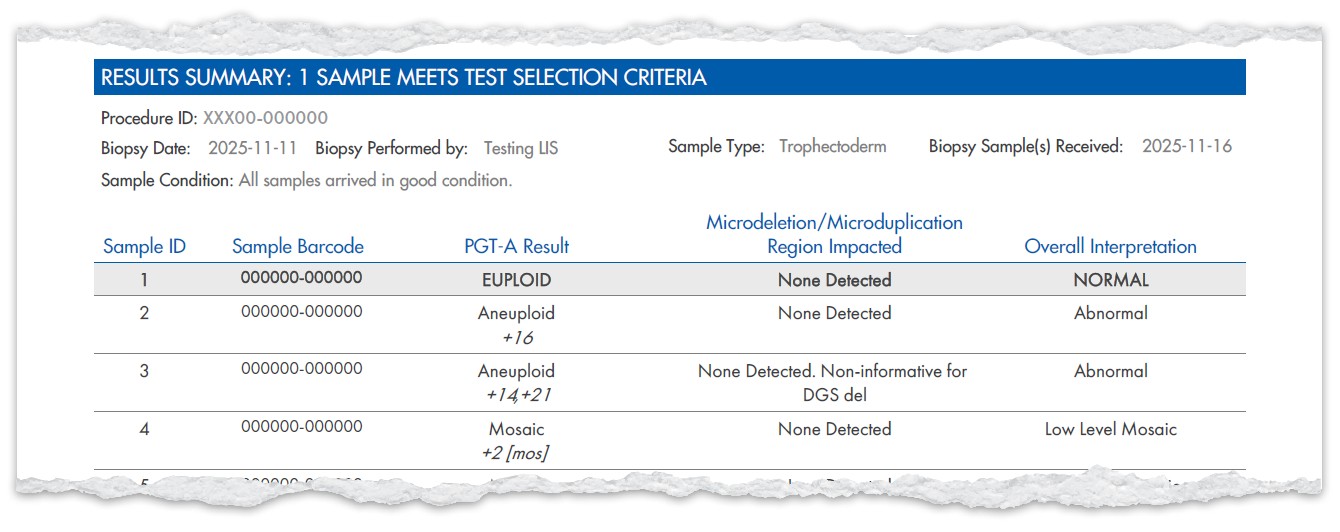
Report example when PGT-A (Including Genetic PN Check), Select Syndrome ScreenSM, and PGT-CompleteSM (parentage testing) are ordered with sex and mosaic reporting
- ‘Parental QC’ updated to ‘Parentage’
- ‘Chromosomes Impacted’ appears
under the PGT-A result when Select
Syndrome Screen is ordered - NEW column for the Select Syndrome
Screen result - ‘Overall Interpretation’ column when
Select Syndrome Screen is ordered
Genomics Client Portal
We are excited to share with you many enhancements and updates to our Genomics Client Portal. We’ve created this resource as a quick reference for clinics and users to easily review what’s new as we continue to enhance the Portal experience.
General Enhancements
Simplified Date Entry:
Date fields (including Date of Birth) on the Patient Management page and Test Requisition Form (TRF) now use manual entry and are aligned with your region’s format:
- US clinics: MM/DD/YYYY
- Clinics outside the US: DD/MM/YYYY
One Password:
Your sign‑on password is now also used to submit the TRF and Biopsy Worksheet. This eliminates the need to manage multiple passwords within the Portal.
Enhanced Report Notification Email:
“Report is Ready” emails now include the Clinic Patient ID, allowing faster navigation to the correct report.
Test Requisition Form (TRF) Updates
Patient Information:
Terminology has been updated for clarity:
- “Partner” is now Patient 2 (Partner)
- “Patient” is now Patient 1
Billing Section Improvements (For US and Canada patients only):
A more comprehensive billing section has been added to reduce back‑and‑forth communication between clinics, patients, and CooperSurgical.
- “Billing Type” now defaults to clinic request and can be adjusted as required within the billing information section.
- Additional fields allow clinics to provide insurance details upfront to support timely processing.

Medical Information (Optional Fields):
Additional fields have been added:
- Number of previous conceptions
- Number of previous miscarriages
- Number of previous deliveries
- Male factor Infertility
Specimen Information Updates:
A user now has the ability to enter the donor ID for both egg and sperm.
Ordering Updates:
Test group options are shown below:
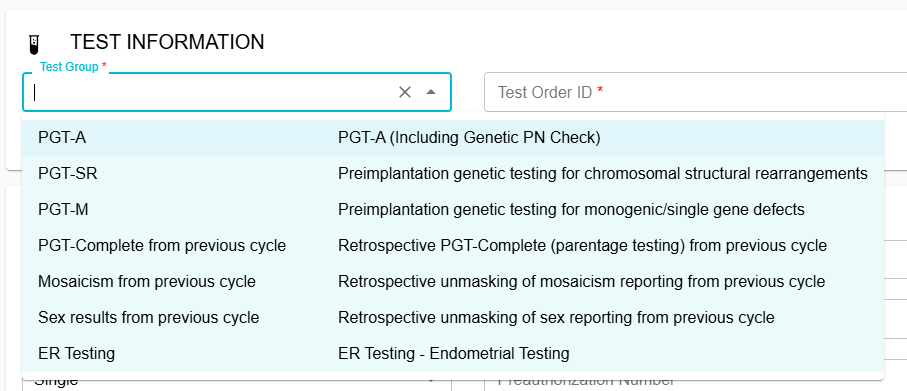
PGT‑CompleteSM (parentage testing):
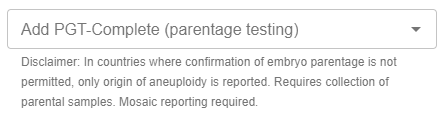
PGT-Complete (parentage testing) is now ordered as an optional upgrade within PGT-A, PGT-SR, or PGT-M test groups (when PGT-A or PGT-SR are included), through the drop down:
Select Syndrome ScreenSM:
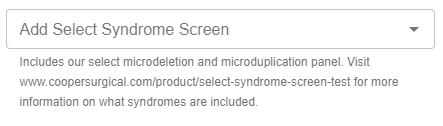
Select Syndrome Screen can be added by selecting “Yes” in the drop down field within PGT-A, PGT-SR or PGT-M test groups (when PGT-A or PGT-SR are included).
Report Sex (formerly “Mask Sex Results”):
This field has been renamed for improved clarity.
Each clinic will have this defaulted based on their location or preference. For example, clinics in the US will default to “Yes”, whereas clinics in the UK will default to “No”. Clinics have the ability to change this.
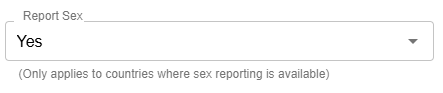
Note: If previously you selected “No” for “Mask Sex Results”, you will need to select “Yes” for “Report Sex”.
Supplemental Document Default:
When uploading documents to a patient, you no longer need to edit, resave and refresh uploaded documents. Now, every document uploaded into the patient’s profile is saved as a Supplemental Document that will flow over to our Client Services team alongside the TRF and BWS.
Document file types supported are: PDF, JPEG, PNG and TIFF
Biopsy Worksheet Enhancements
Expanded Barcode Entry & View:
The barcode field now supports a 13-character view allowing for faster entry and review of samples.
Streamlined Sample Entry:
Users can now replicate rows during sample entry to save time and improve consistency.

Thank you for your attention to these important updates.
We are confident that these changes to the TRF and our reports will streamline your workflow and provide deeper insights.
If you have any questions, please don’t hesitate to reach out to your regional genomics support team.
Select Syndrome Screen is a genetic test intended only as a screening tool, which is designed to evaluate embryos for certain syndromes or chromosomal abnormalities. It is not a diagnostic test and cannot detect all genetic or health conditions. Healthcare providers should review the test’s indications, limitations, and potential risks and discuss these with their patients to determine whether the test is appropriate for the patient’s individual circumstances. Results for Select Syndrome Screen should be interpreted in the context of other clinical information and are subject to limitations such as mosaicism and technical variability. Medical guidelines and healthcare providers recommend that any pregnancy resulting from an embryo screened with this test undergo confirmatory diagnostic testing, such as chorionic villus sampling (CVS) or amniocentesis, to verify genetic status.